Mesa Upgrade
The Mesa upgrade is a major network upgrade (hard fork) for the Mina Protocol mainnet. It is not backward compatible and requires all nodes to upgrade.
Please refer to the Mesa node release notes here.
This documentation uses terms like automode, stop-slot, trustless upgrade, dispatcher, and more. If you encounter an unfamiliar term, check the Glossary for definitions.
What Mesa Introduces
Expanded zkApp State
Mesa extends the on-chain state available to zkApps from 8 fields (indexes 0–7) to 32 fields (indexes 0–31) per account. This significantly increases the data capacity available to smart contracts, enabling more complex application logic without off-chain workarounds.
Automode Upgrades
For the first time in Mina's history, node operators can upgrade through a hard fork without manual intervention. The automode mechanism ships both the pre-fork and post-fork binaries in a single package, with a dispatcher that automatically transitions to the new chain when the fork activates. See Upgrade Modes for details.
Simplified Archive Upgrade
Unlike the Berkeley upgrade (which required up to 48 hours for archive database conversion), the Mesa archive upgrade is a fast schema upgrade that completes in under a minute. See Archive Upgrade.
Upgrade Flow — End-to-End Timeline
The Mesa upgrade follows four phases. The timeline below shows what happens at each stage, when it happens, and what you need to do.
Overview
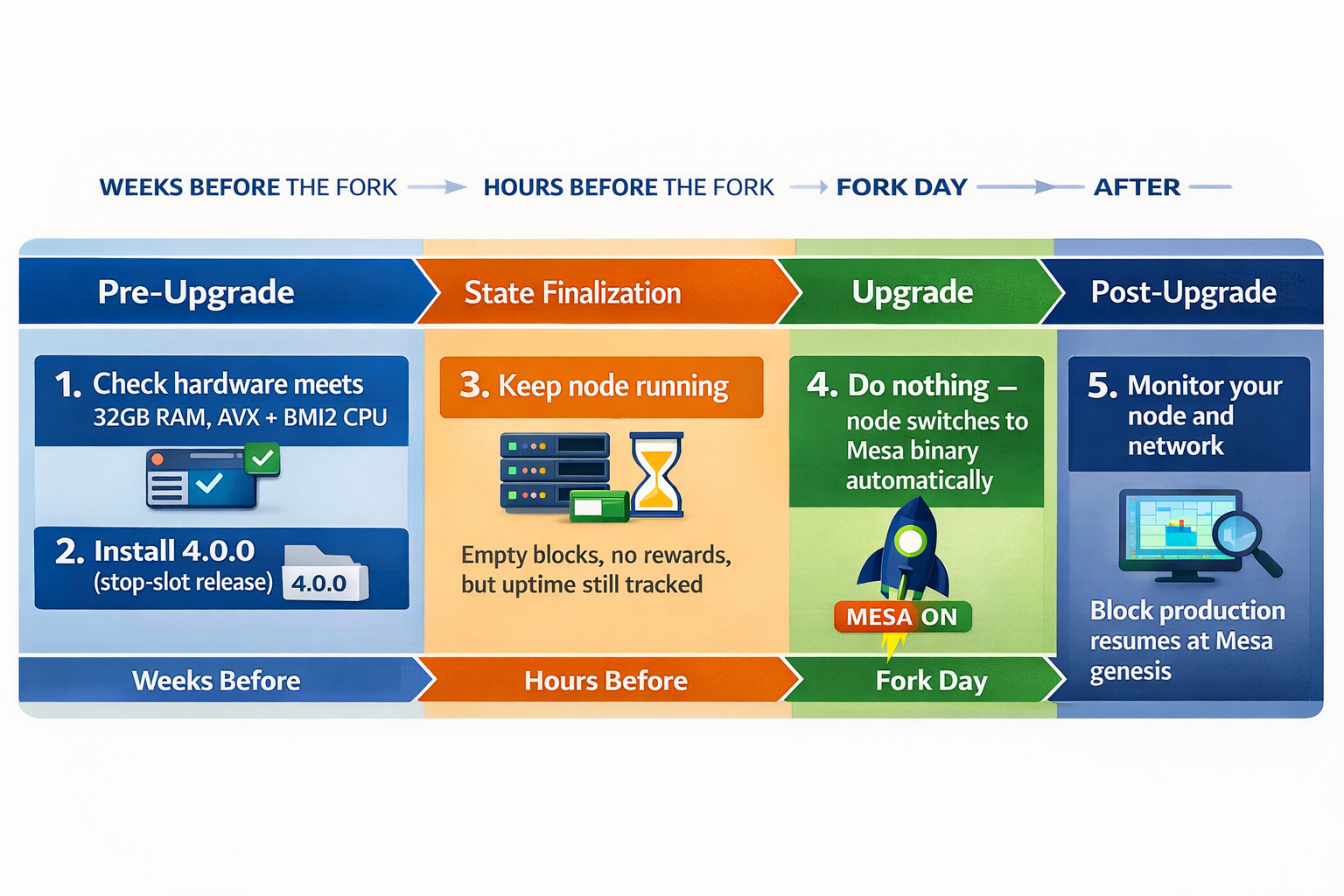
The upgrade moves through four phases — Pre-Upgrade, State Finalization, Upgrade, and Post-Upgrade — anchored by three key moments:
| Milestone | When | What happens |
|---|---|---|
| stop-transaction-slot | Hours before the fork | Network stops accepting new transactions |
| stop-network-slot | ~5 hours after stop-transaction-slot | Block production halts entirely |
| Mesa genesis timestamp | ~1 hour after Mesa release is published | First Mesa block is produced |
Phase 1: Pre-Upgrade — weeks before the fork
Goal: Every participant is prepared and running the stop-slot release before the fork begins.
| Actor | What to do |
|---|---|
| All operators | Verify hardware requirements (32 GB RAM, 8-core CPU with AVX/BMI2). Back up keys. |
| Block Producers | Choose upgrade mode: automode (recommended) or manual. Install stop-slot release 3.x.x. If automode, install both prefork and postfork packages. |
| SNARK Workers | Follow the same path as block producers (automode or manual). |
| Archive Nodes | Install stop-slot release. Choose upgrade method: trustless (run upgrade script now) or trustful (import o1Labs dump later). If trustless, run the archive upgrade script — it is backward compatible and can be applied early. |
| Exchanges | Install stop-slot release. Update integrations (mina-signer, Rosetta API). Test on devnet. Plan deposit/withdrawal freeze window. |
| zkApp Developers | Update to the Mesa-compatible o1js version, recompile your contract, and verify it on the preflight network. Plan to redeploy on Mesa after the fork — every zkApp must be redeployed because the protocol version bump changes the verification key. |
Use the detailed Pre-Upgrade checklist to verify every item before proceeding.
Phase 2: State Finalization — hours before the fork (~5 hours)
Goal: The network reaches consensus on a final state. No new transactions are accepted.
At the predefined stop-transaction-slot, nodes stop accepting new user transactions. Block production continues for ~100 more slots with empty blocks (no coinbase, no fees) until the stop-network-slot to ensure all nodes converge on the same state.
| Actor | What to do |
|---|---|
| Block Producers | Keep your node running. Block density during finalization is critical. Do not stop your node. |
| SNARK Workers | Keep running. Continue producing SNARK work. |
| Archive Nodes | Keep the archive node running to capture all finalized blocks. If doing trustless upgrade, run the upgrade script now if you haven't already. |
| Exchanges | Disable MINA deposits and withdrawals. Any transactions submitted after the stop-transaction-slot will not exist on the Mesa chain. |
| zkApp Developers | No action required. Monitor announcements. |
Transactions submitted after the stop-transaction-slot will not carry over to the Mesa chain. Freeze all MINA activity before this point.
Phase 3: Upgrade — fork day (network is down)
Goal: The network halts, state is exported, and the Mesa release is published.
At the stop-network-slot, block production stops entirely. o1Labs exports the network state, builds the Mesa release with the final ledger baked in, and publishes packages and Docker images.
| Actor | What to do |
|---|---|
| Block Producers (automode) | Nothing. Your node transitions to Mesa automatically. It will start producing blocks when the Mesa genesis timestamp arrives. |
| Block Producers (manual) | Stop your node. Wait for the Mesa release announcement. Install the new package. Restart with updated flags. |
| SNARK Workers | Follow the same mode as your coordinator (automode = automatic, manual = reinstall and restart). |
| Archive Nodes | Install the Mesa archive node release. Point it at your upgraded database (trustless) or import the o1Labs SQL dump into a fresh database (trustful). |
| Exchanges | Install the Mesa release. Keep deposits/withdrawals disabled until Mesa block production begins. |
Phase 4: Post-Upgrade — after the fork
Goal: Block production resumes on the Mesa network. Normal operations return.
At approximately 1 hour after the Mesa release is published, at the predefined Mesa genesis timestamp, the first Mesa block is produced.
| Actor | What to do |
|---|---|
| Block Producers | Verify your node is on the Mesa chain (mina client status). If automode, check that the activated file exists in your config directory (see Troubleshooting). Monitor block production. |
| SNARK Workers | Reconnect workers to the upgraded coordinator. Verify SNARK work is being produced. |
| Archive Nodes | Verify the archive database is in sync. Run validation checks. Fix any missing blocks using archive tooling. |
| Exchanges | Re-enable MINA deposits and withdrawals once block production is confirmed and your systems are verified. |
| zkApp Developers | Redeploy every zkApp on Mesa — the protocol version bump invalidates Berkeley verification keys, so a redeploy is required before any zkApp can accept transactions. You can also take advantage of the expanded 32-field on-chain state at this point. |
Timeline by Role
Select your role to see a simplified view of what you need to do and when.
Block Producers & SNARK Workers (automode)
Your upgrade is hands-free. Install the stop-slot release weeks before the fork, keep your node running through state finalization, and the automode dispatcher handles the transition automatically. After the fork, verify your node is on the Mesa chain.
Block Producers & SNARK Workers (manual mode)
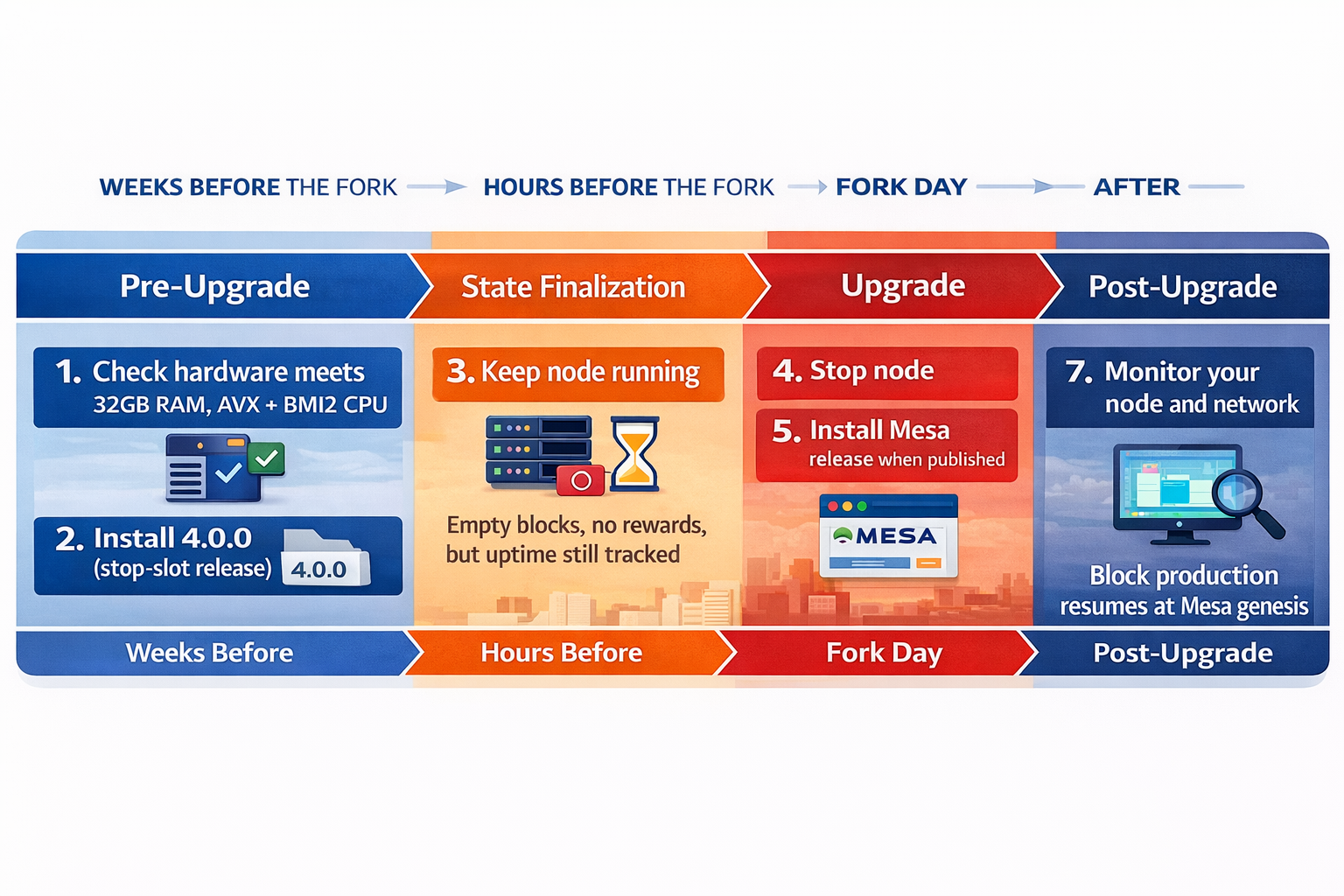
You must take action on fork day: stop your node after the network halts, install the Mesa release when published, and restart. You have until 290 blocks into the Mesa chain to complete the upgrade without missing your slots.
Archive Node Operators
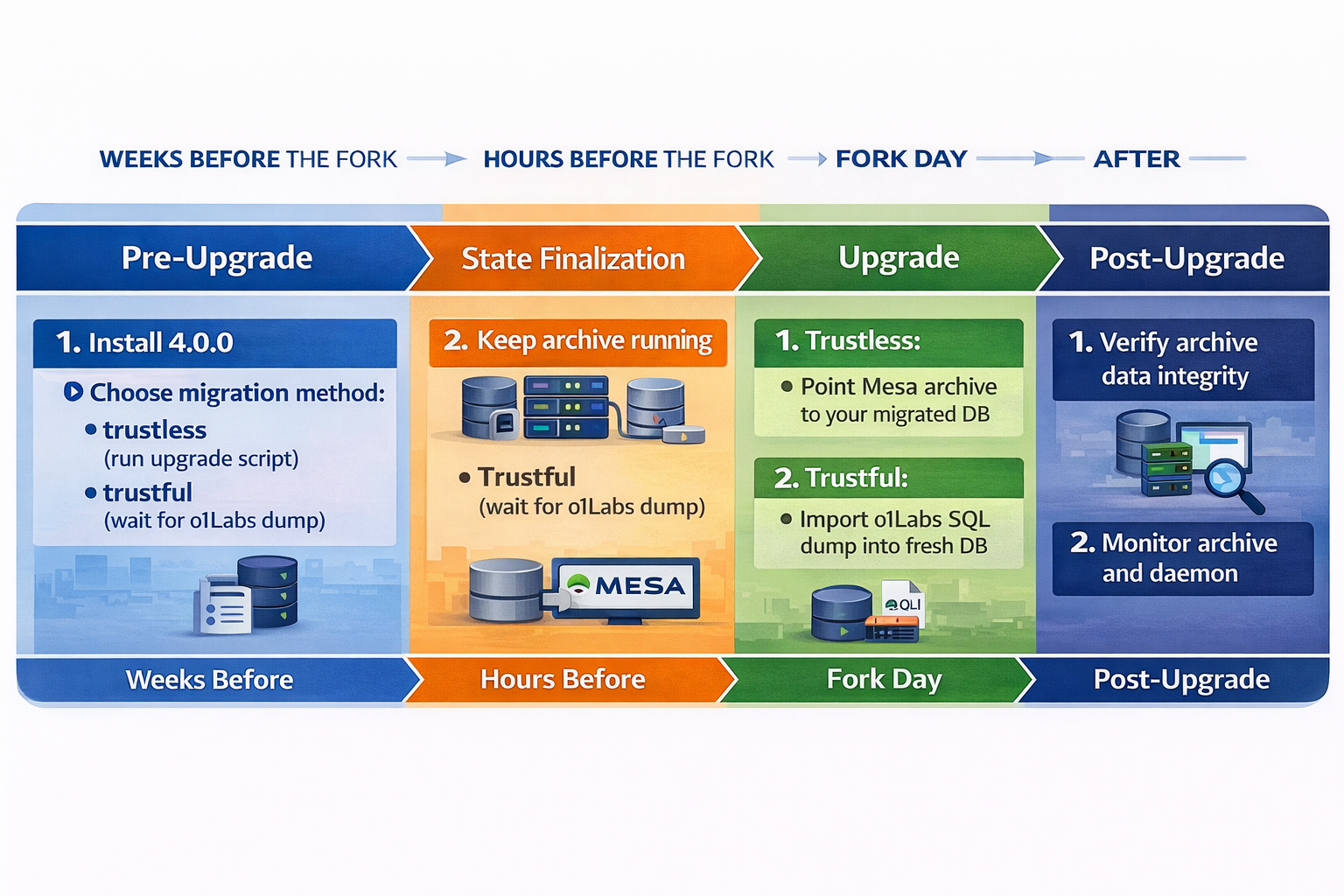
Choose your upgrade method early:
- Trustless: Run the archive upgrade script before the fork (it's backward-compatible). After the fork, point the Mesa archive node at your upgraded DB.
- Trustful: Wait for the o1Labs SQL dump after the fork and import it into a fresh database.
After the fork, verify data integrity and monitor the archive daemon.
Exchanges & Service Providers
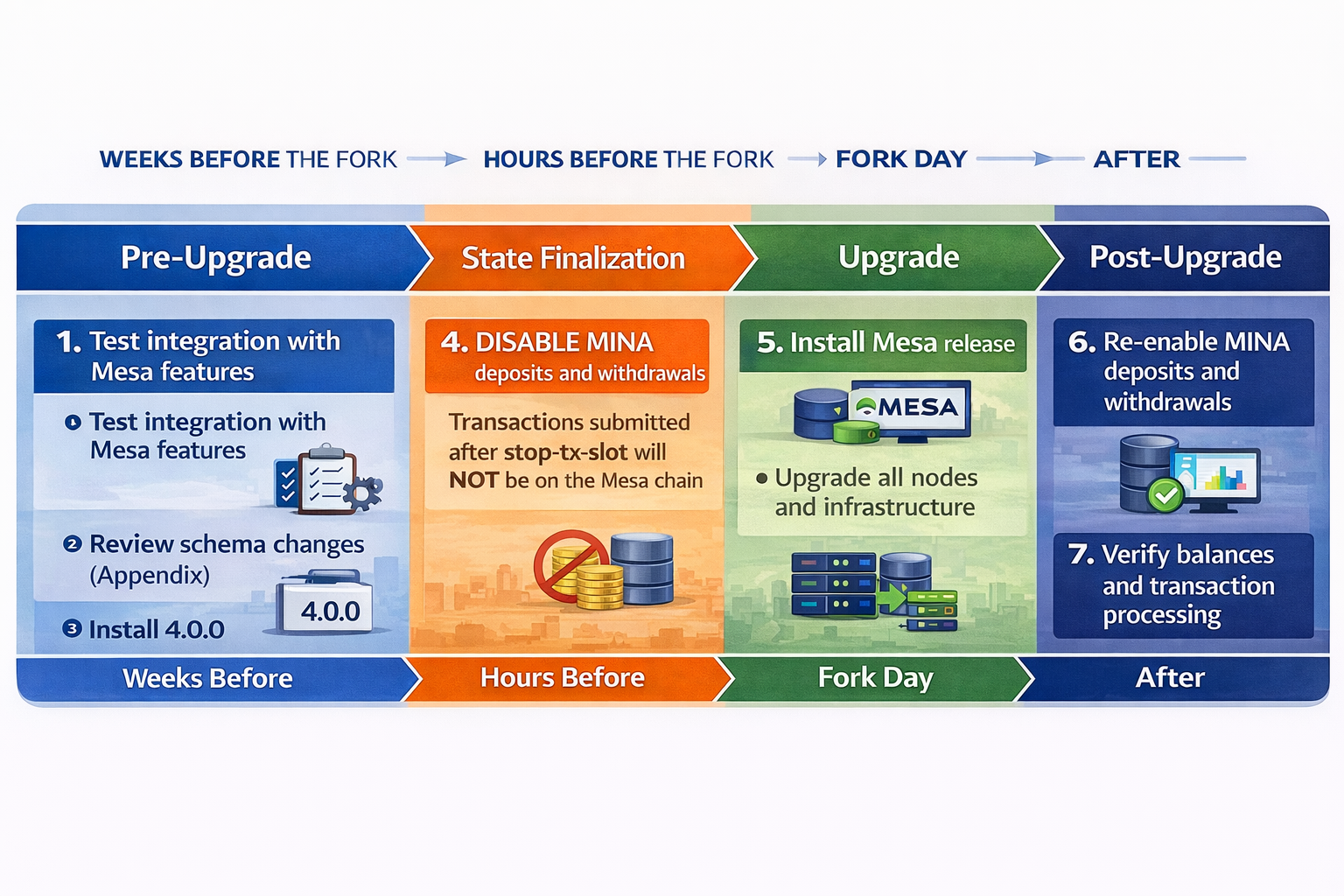
The critical action is timing your deposit/withdrawal freeze. Disable MINA activity before the stop-transaction-slot. Install the Mesa release on fork day. Re-enable deposits and withdrawals only after block production is confirmed and your integration is verified.
For step-by-step instructions, see Upgrade Steps.
Upgrade Modes
There are two ways to upgrade your daemon node:
- Automode (Recommended): The daemon handles the fork transition automatically. You install the stop-slot release and the node takes care of the rest — no manual intervention during the fork.
- Manual: You manually stop your node after the network halts, install the Mesa release, and restart. This gives you full control.
For in-depth technical details on the dispatcher and dual-binary architecture, see Upgrade Modes - Details.
When the fork activates, the automode daemon shuts down cleanly (exit code 0) after writing the Mesa configuration and an activated marker file to the config directory. It does not restart itself — your process manager must restart it. On restart, the dispatcher detects the activated file and launches the Mesa binary automatically.
This means two things are required:
- Persistent filesystem: The config directory (e.g.,
~/.mina-configor the Docker volume at/root/.mina-config) must survive across restarts. If it is wiped, theactivatedfile and generated Mesa config are lost, and the node cannot transition to Mesa. - Automatic restart policy: Your process manager must be configured to restart the daemon after a clean exit:
- systemd: Use
Restart=alwaysin your service file (this is the default in the Mina systemd unit) - Docker: Use
--restart=alwaysor--restart=unless-stoppedwhen creating the container - Kubernetes / Helm: Ensure your pod has
restartPolicy: Always(the k8s default). If you use a customlivenessProbeor a Helm chart with its own restart logic, verify it does not treat exit code 0 as a failure that triggers a full volume wipe or pod replacement.
- systemd: Use
The automode dispatcher only supports the daemon subcommand and mina client status command. Other subcommands (e.g. mina accounts list, mina ledger export) will fail with an error. This is because, for non-daemon commands, the dispatcher does not have access to the config directory location and therefore cannot determine whether the node is running Berkeley or Mesa. It is the user's responsibility to invoke the correct version-specific binary directly: mina-berkeley or mina-mesa (or the full paths /usr/lib/mina/berkeley/mina and /usr/lib/mina/mesa/mina). This limitation may be removed in a future release.
Upgrade Examples
The examples below walk through the entire upgrade for different roles and setups. Each follows the same four phases. Click to expand.
Example: Block Producer Upgrading with Automode (Debian)
Imagine you are Alice, a block producer running on a Debian server. Here is what your upgrade looks like end to end.
Weeks before the fork — Alice checks hardware requirements and installs the automode packages:
sudo apt-get update
sudo apt-get install mina-mainnet-prefork-mesa=3.x.x mina-mainnet-postfork-mesa=4.x.x
She starts her node normally. The automode dispatcher runs the pre-fork binary until the fork activates.
For full pre-upgrade checklist, see Pre-Upgrade.
Hours before the fork (State Finalization) — The network reaches the stop-transaction-slot. Alice's node keeps producing blocks — she does nothing. Empty blocks are produced for ~100 slots (~5 hours) until all nodes agree on the final state.
For details on this phase, see State Finalization.
Fork day (Upgrade) — The network halts at the stop-network-slot. Alice's daemon generates the Mesa configuration, writes the activated marker file, and shuts down cleanly (exit code 0). Because Alice uses systemd with Restart=always, the daemon restarts automatically. On restart, the dispatcher detects the activated file and launches the Mesa binary. Alice does nothing — this all happens automatically.
For what happens if you chose manual mode instead, see Upgrade. For details on the restart mechanism, see Upgrade Modes - Details.
After the fork (Post-Upgrade) — About 1 hour after the Mesa release is published, the first Mesa block is produced. Alice verifies:
# Check if the activated file exists (path depends on your config directory and network ID)
ls ~/.mina-config/auto-fork-mesa-mainnet/activated

# Confirm Mesa chain ID
mina client status
The automode dispatcher only supports the daemon subcommand and client status command — it cannot determine the active runtime for other commands because they don't pass the config directory. For commands like accounts list, or ledger export, use the correct version-specific binary directly: mina-mesa (after the fork) or mina-berkeley (before the fork). The full paths /usr/lib/mina/mesa/mina and /usr/lib/mina/berkeley/mina also work. This limitation may be removed in a future release.
She's done. Her node is producing blocks on Mesa.
For post-upgrade flags and monitoring, see Post-Upgrade.
Example: Block Producer — Manual Mode (Docker)
Carlos runs a block producer using Docker and prefers manual control over the upgrade.
Weeks before the fork — Carlos pulls the stop-slot Docker image and starts his node:
docker pull minaprotocol/mina-daemon:<version>-bullseye-mainnet

docker run --name mina -d \
  minaprotocol/mina-daemon:<version>-bullseye-mainnet \
  daemon \
    --block-producer-key /keys/my-wallet \
    --config-directory /root/.mina-config \
    --libp2p-keypair /keys/libp2p-key \
    --peer-list-url https://bootnodes.minaprotocol.com/networks/mainnet.txt \
    --generate-genesis-proof true \
    --file-log-rotations 500 \
    --log-json
For full pre-upgrade checklist, see Pre-Upgrade.
Hours before the fork (State Finalization) — Carlos keeps his node running. He does nothing during this phase.
For details on this phase, see State Finalization.
Fork day (Upgrade) — The network halts at the stop-network-slot. Carlos waits for the Mesa release announcement, then swaps to the new image.
Throughout these examples,
<mesa-version>is a placeholder for the Mesa release tag announced for your target network. For the preflight network the current value is published on Preflight Network; for devnet/mainnet the value will be published with the corresponding release announcement.
docker stop mina && docker rm mina

docker pull minaprotocol/mina-daemon:<mesa-version>-bullseye-mainnet

docker run --name mina -d \
  minaprotocol/mina-daemon:<mesa-version>-bullseye-mainnet \
  daemon \
    --block-producer-key /keys/my-wallet \
    --config-directory /root/.mina-config \
    --libp2p-keypair /keys/libp2p-key \
    --peer-list-url https://bootnodes.minaprotocol.com/networks/mainnet.txt \
    --generate-genesis-proof true \
    --file-log-rotations 500 \
    --log-json
For detailed upgrade instructions, see Upgrade.
After the fork (Post-Upgrade) — About 1 hour later, block production starts. Carlos verifies:
docker exec mina mina client status # confirms Mesa chain ID
For post-upgrade flags and monitoring, see Post-Upgrade.
Example: Block Producer — Manual Mode (Debian)
Diana runs a block producer on a Debian server using systemd and prefers to upgrade manually.
Weeks before the fork — Diana installs the stop-slot release:
sudo apt-get update
sudo apt-get install mina-mainnet=3.x.x
She restarts her node via systemd and confirms it syncs.
For full pre-upgrade checklist, see Pre-Upgrade.
Hours before the fork (State Finalization) — Diana keeps her node running. No action required.
For details on this phase, see State Finalization.
Fork day (Upgrade) — The network halts. Diana waits for the Mesa release announcement, then upgrades:
sudo systemctl stop mina

sudo apt-get update
sudo apt-get install mina-mainnet=4.x.x

# Restart with the same flags (libp2p key can be reused)
sudo systemctl start mina
For detailed upgrade instructions, see Upgrade.
After the fork (Post-Upgrade) — Block production resumes. Diana verifies:
mina client status # confirms Mesa chain ID
For post-upgrade flags and configurations, see Post-Upgrade.
Example: Archive Node / Explorer Operator
Eve runs an archive node, a Rosetta API instance, and a block explorer. She needs to upgrade both the daemon and the database.
Weeks before the fork — Eve installs the stop-slot release and decides on her upgrade method:
sudo apt-get update
sudo apt-get install mina-mainnet=3.x.x
She chooses the trustless path — running the upgrade script early, while her archive is still online:
# Back up the database first
pg_dump -U <user> archive_db > berkeley-archive-backup.sql

# Download and run the upgrade script (completes in under 1 minute)
curl -O https://raw.githubusercontent.com/MinaProtocol/mina/refs/heads/mesa/src/app/archive/upgrade_to_mesa.sql
psql -U <user> -d archive_db -f upgrade_to_mesa.sql

# Verify
psql -U <user> -d archive_db -c "SELECT * FROM version;"
The script is backward-compatible — her existing Berkeley archive node keeps working normally after the upgrade.
For the full archive upgrade guide, see Archive Upgrade.
Hours before the fork (State Finalization) — Eve keeps her archive node running to capture all finalized blocks.
For details on this phase, see State Finalization.
Fork day (Upgrade) — The network halts. Eve installs the Mesa archive release and points it at her already-upgraded database:
sudo systemctl stop mina-archive
sudo systemctl stop mina

sudo apt-get update
sudo apt-get install mina-archive-mainnet=4.x.x mina-mainnet=4.x.x

# Start archive process pointing to the upgraded DB
mina-archive run \
  --postgres-uri postgres://<user>:<pass>@localhost:5432/archive_db \
  --server-port 3086 \
  --log-json --log-level DEBUG

# Start the non-block-producing daemon connected to the archive
mina daemon \
  --archive-address localhost:3086 \
  --config-directory ~/.mina-config \
  --libp2p-keypair ~/keys/libp2p-key \
  --peer-list-url https://bootnodes.minaprotocol.com/networks/mainnet.txt \
  --generate-genesis-proof true \
  --file-log-rotations 500 \
  --log-json
She also restarts Rosetta:
docker run --name rosetta --rm -d \
  -p 3088:3088 \
  --entrypoint '' \
  minaprotocol/mina-rosetta:<mesa-version>-bullseye-mainnet \
  /usr/local/bin/mina-rosetta \
    --archive-uri "postgres://<user>:<pass>@localhost:5432/archive_db" \
    --graphql-uri "http://localhost:3085/graphql" \
    --log-json --port 3088
For detailed upgrade instructions, see Upgrade.
After the fork (Post-Upgrade) — Block production resumes. Eve verifies data integrity:
# Check the archive is in sync
mina client status

# Run the verification toolbox
mina-archive-hardfork-toolbox verify-upgrade \
  --postgres-uri postgres://<user>:<pass>@localhost:5432/archive_db \
  --protocol-version <version> \
  --migration-version <version>
She checks her explorer UI to confirm new Mesa blocks are appearing and the historical data is intact.
For the full validation workflow, see Post-Upgrade and the Archive Hardfork Toolbox.
Example: zkApp Developer
Frank maintains a zkApp deployed on mainnet. His contract uses on-chain state and he wants to take advantage of Mesa's expanded 32-field state.
Weeks before the fork — Frank updates his o1js dependency to the Mesa-compatible version and tests his zkApp on the preflight network:
npm install o1js@latest
He verifies that:
- His contract recompiles cleanly against Mesa-compatible o1js and deploys on the preflight Mesa network
- Transactions execute end-to-end against the redeployed contract
- If he plans to use the expanded state fields (indexes
8–31), his updated contract version compiles and deploys on preflight
For details on testing with the preflight network, see Preflight Network.
Hours before the fork (State Finalization) — Frank does nothing. His deployed zkApp keeps running on the Berkeley chain. No transactions can be submitted during this phase anyway.
Fork day (Upgrade) — Frank does nothing during the network halt. His zkApp account and on-chain state values carry over to the Mesa chain automatically (including state fields at indexes 0–7). However, the verification key generated for Berkeley is no longer valid under the Mesa protocol — the contract cannot process transactions on Mesa until it is redeployed.
After the fork (Post-Upgrade) — Block production resumes on Mesa. Frank must redeploy his zkApp before it can accept transactions, regardless of whether he uses the new state fields:
# Required for every zkApp — the Mesa protocol version bump invalidates the Berkeley verification key
zkapp deploy --network mainnet
If he is also adopting the expanded 8–31 state slots, this same deployment step ships the updated contract version that declares the new fields.
For post-upgrade details, see Post-Upgrade.
Example: Exchange Upgrading to Mesa
Bob is an exchange operator. His main concern is avoiding lost deposits.
Weeks before the fork — Bob tests his integration (Rosetta API, mina-signer) on the preflight network. He reviews schema changes and installs the stop-slot release:
sudo apt-get install mina-mainnet=3.x.x
For the full exchange pre-upgrade checklist, see Pre-Upgrade.
Hours before the fork — Before the stop-transaction-slot arrives, Bob disables MINA deposits and withdrawals on his platform and notifies customers about the maintenance window.
Any transactions submitted after the stop-transaction-slot will not exist on the Mesa chain. This is the most critical step for exchanges.
Fork day — The network halts. Bob waits for the Mesa release announcement, then upgrades:
sudo systemctl stop mina
sudo apt-get update
sudo apt-get install mina-mainnet=4.x.x
sudo systemctl start mina
For detailed upgrade instructions, see Upgrade.
After the fork — Block production resumes. Bob verifies his node is on the Mesa chain, confirms Rosetta API is working, then re-enables MINA deposits and withdrawals.
mina client status   # verify Mesa chain ID
# test a small internal transfer before opening to customers
For post-upgrade flags and configurations, see Post-Upgrade.
Quick Reference by Operator Type
| Operator Type | Key Pages |
|---|---|
| Block Producers | Requirements, Upgrade Modes, Upgrade Steps, Post-Upgrade Flags |
| SNARK Workers / Coordinators | Requirements, Upgrade Steps, Post-Upgrade Flags |
| Archive Node Operators | Requirements, Archive Upgrade, Upgrade Steps, Post-Upgrade |
| Rosetta API Operators | Archive Upgrade, Upgrade Steps, Post-Upgrade Flags, Post-Upgrade |
| Exchanges | Requirements, Upgrade Steps, Appendix |
Network Details
Chain ID
a7351abc7ddf2ea92d1b38cc8e636c271c1dfd2c081c637f62ebc2af34eb7cc1

Git SHA-1
ae112d3a96fe71b4ccccf3c54e7b7494db4898a4

Seed List
https://bootnodes.minaprotocol.com/networks/mainnet.txt

Node build
https://github.com/MinaProtocol/mina/releases